Live Co-Pilot
Rack Analyst and Board Evaluator give you a snapshot. Live Co-Pilot stays with you for the whole hand — a fresh recommendation after every draw, tracking whose turn it is as you go. It's built to sit open on a tablet at the table.
How to use it
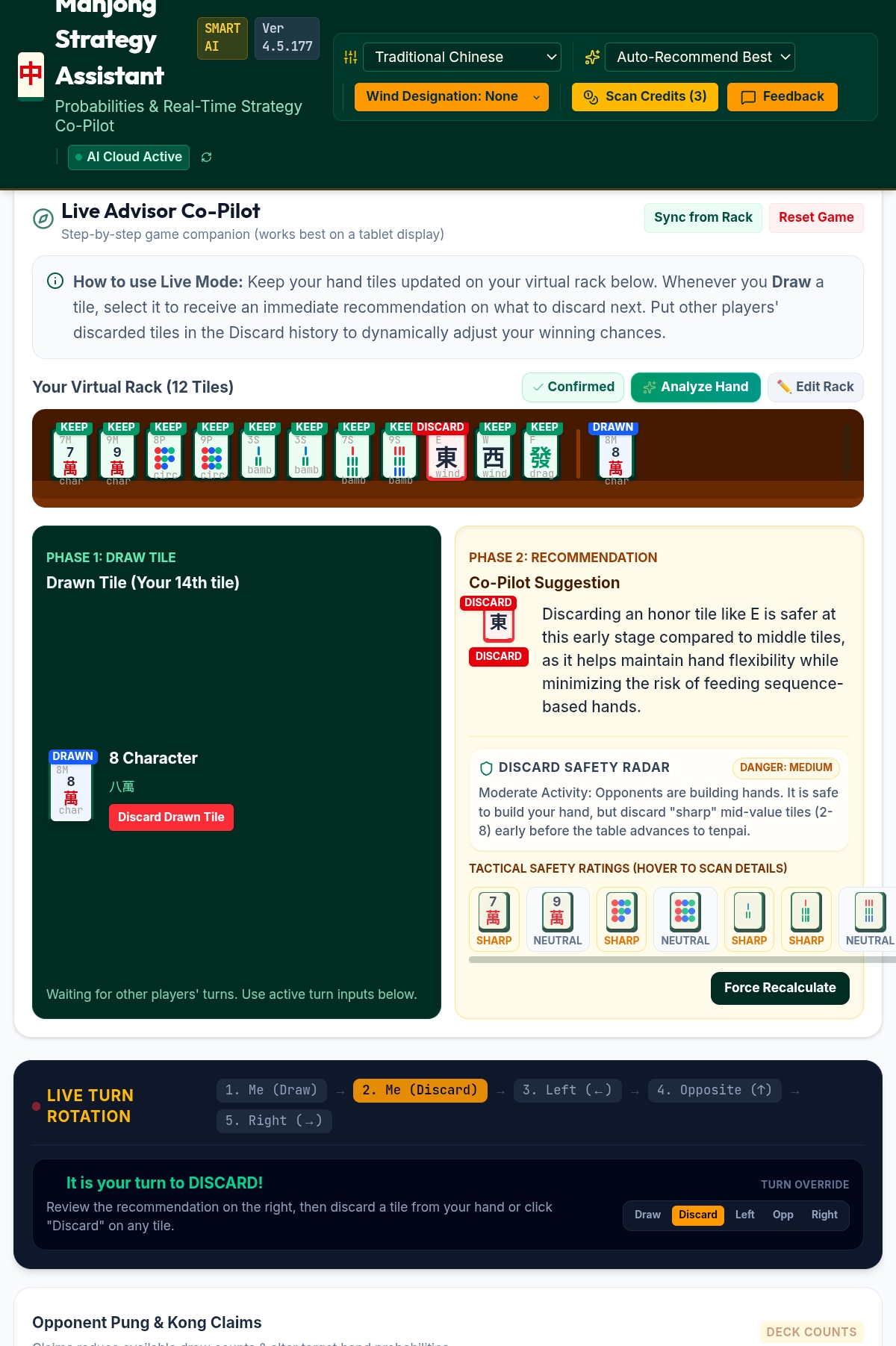
Sync from Rack
If you've already scanned your rack in Rack Analyst or Board Evaluator, tap Sync from Rack to bring those same tiles into Live Co-Pilot instead of starting over.
Confirm your starting rack
Once your rack looks right, tap Confirmed to lock it in as your starting hand for the game. This tidies the screen for active play — you can still tap Edit Rack at any time if you need to fix something.
Draw a tile
Each turn, use the draw controls to add your newly drawn tile. It appears highlighted so you know it's the one just picked up.
Read the Co-Pilot Suggestion
The app immediately recommends which tile to discard and explains why in plain language, alongside a Discard Safety Radar — a read on how risky each tile is to throw away given what other players might be building.
Discard, and move to the next turn
Confirm your discard, then use Live Turn Rotation to step through the other players' turns — draw, left, opposite, right — logging what they discard as you go.
Log opponent Pungs and Kongs
If another player calls a Pung or Kong, record it under Opponent Pung & Kong Claims. This keeps the deck count and everyone's odds accurate for the rest of the hand.
If your hand ever drops to zero tiles — say, after a big call from another player — the tile drawer reappears automatically so you can rebuild your rack, even while it's marked Confirmed.
Whenever you log an opponent's discard — whether through Live Turn Rotation or the Discard History list — Live Co-Pilot automatically checks whether you could call it, and a flashing amber card pops up right away if you can. Pung/Kong-style calls can come from any direction; a sequence call can only ever come from the player immediately to your left, matching the real rule. In Riichi, these alerts use Riichi's own terms — Pon, Kan, and Chi — rather than the Chinese terms used in other rulesets. Tap the card to claim it, or Pass to keep it in hand.
On rulesets where wind affects scoring, a small Seat: … / Round: … badge appears near the top of this panel, confirming exactly what context is feeding each discard recommendation. See the Riichi Setup Guide for how seat and round wind actually change the score — and if you're tracking a full session in Score Sheet, Round Wind can advance on its own as the deal rotates.
Use Reset Game to clear everything and start fresh for a new hand — your ruleset and wind settings stay as they were.