
Before your first scan
Two choices at the top of the screen shape every recommendation the app gives you. Set these first, then get familiar with the five tabs — everything else builds on them.
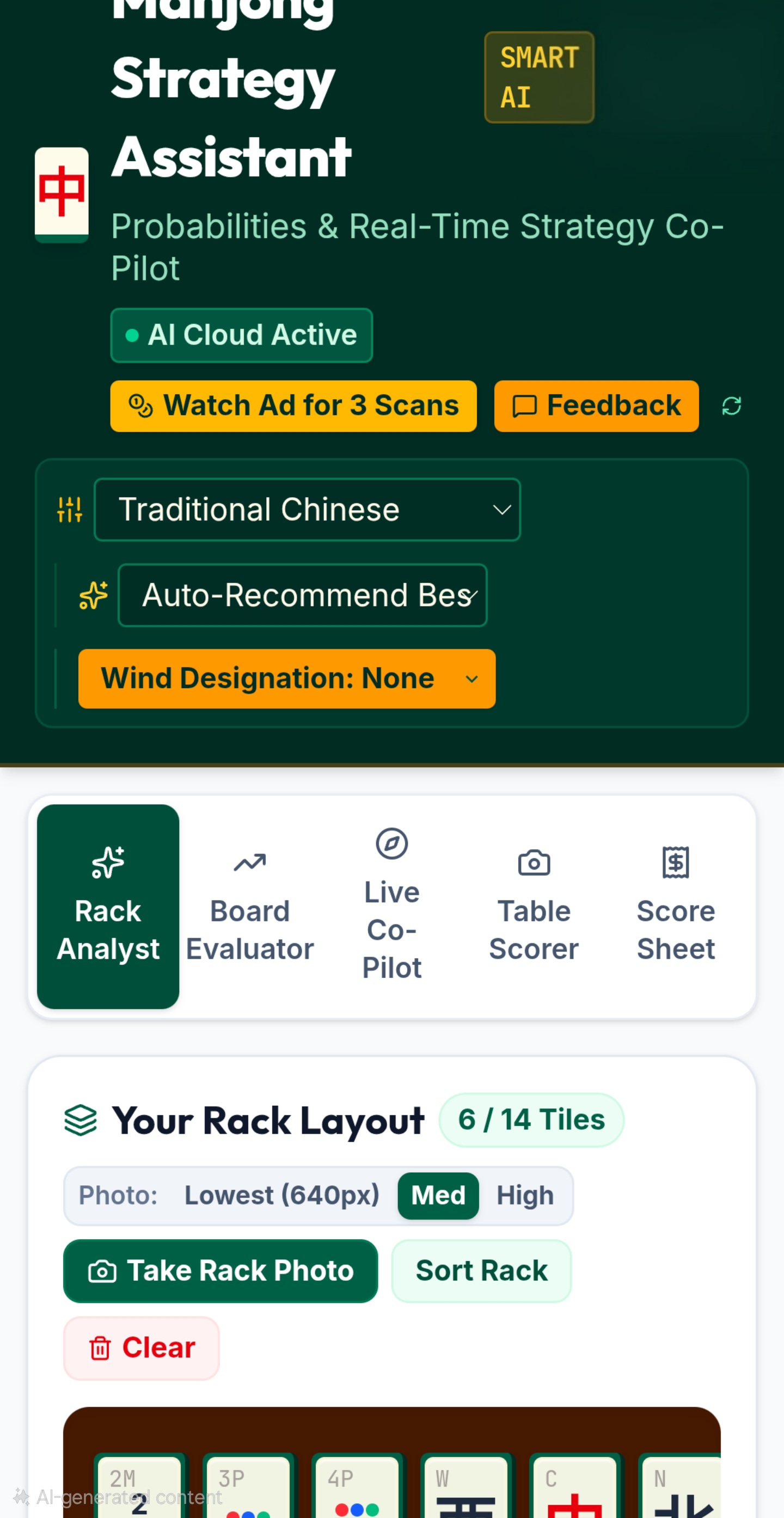
1. Pick your ruleset
The dropdown in the top bar (shown as Traditional Chinese above) sets which scoring system the app uses for every recommendation and score calculation. Choose the one your table actually plays — Hong Kong Cantonese, Riichi, American (NMJL), Taiwanese, Singapore, Malaysian, or Vietnamese — or switch to Custom Hands for the 177-hand catalogue. See Rulesets & Custom Hands for what each one covers.
Your ruleset choice is remembered the next time you open the app, so you only need to set it once per session at the table.
2. Auto-Recommend Best, or target a specific hand
By default the app looks at your rack and works out the strongest hand to chase on its own — that's Auto-Recommend Best. If you'd rather steer toward one specific hand yourself, open this dropdown and pick it directly; the app will then judge every keep/discard decision against that one target instead.
A target hand you choose only applies to the rack you're currently working on. The next time you scan a fresh rack, this resets back to Auto-Recommend Best — so you're never accidentally locked into an old target from a previous hand.
3. Seat Wind & Round Wind (for scoring accuracy)
Two dropdowns in the top bar — Seat Wind and Round Wind — feed directly into Rack Analyst, Board Evaluator, and Live Co-Pilot's advice. A wind tile that matches your seat, the round, or both is worth real fan/han value, so the app factors this in when weighing whether a wind tile is worth keeping.
These only appear for rulesets where wind genuinely affects scoring — Riichi, Cantonese, Traditional, Basic/Booklet Hands, and Vietnamese. Switch to Taiwanese, Singapore, Malaysian, or NMJL and they disappear, since wind doesn't change the score in those rulesets.
Playing Riichi specifically? The Riichi Setup Guide goes deeper — why seat and round wind stack, dora indicators, and a quick yaku reference.
If you're running a full session in Score Sheet with Tonpuusen or Hanchan tracking on, Round Wind advances automatically as the deal rotates — you don't need to touch it by hand. The dropdown here still works as a manual override at any time.
If you haven't set your Seat Wind on a ruleset where it matters, Rack Analyst, Board Evaluator, and Live Co-Pilot each show an amber warning badge in their panel until it's set — advice given without it is missing real information, not just less precise.
Only a handful of named hands in the 177-hand catalogue actually use wind — the rest score exactly the same whether it's set or not. See Rulesets & Custom Hands for which specific hands care.
4. The five tabs
Everything else in the app lives under one of five tabs, each suited to a different moment in a game:
Rack Analyst
Scan your rack any time you want a fresh strategic read — what to keep, what to discard, and your best path to a win.
Board Evaluator
The same analysis as Rack Analyst, but also aware of what's already been discarded at the table.
Live Co-Pilot
Stay open for an entire hand, giving you a fresh suggestion after every single draw.
Table Scorer
Score a completed winning hand — by camera or by hand.
Score Sheet
Track running results across an entire multi-hand session or tournament.